Continuous Training Management for the Portuguese Scout Association
Training is mandatory. Seeing who was actually completing it wasn't.
Why it matters — how many credits someone has, whether they can advance, and where they are right now are three different questions. The interface had to answer them separately.
Product Designer, module owner · AppX
Ten documented state variants on the management view
Documented for implementation — no usage data
The decision I'd defend — credits, eligibility and status as three independent signals, not one progress bar.
Seeing isn't acting
Continuous Training was documented component by component, with ten state variants on the management view and every filter tied to the rule behind it. Implementation has something to follow.
What the design established was a separation: how many credits someone has, whether they can advance, and where they are right now are three questions with three answers. The management view uses that separation to surface whoever is close.
What I don't know is whether anyone does anything with it. Making something visible doesn't make it actionable, and that distance is the only thing worth measuring.
Thanks to the AppX team, who made me justify every decision.
The Problem
Being a leader in CNE requires training, and requires maintaining it. Credits accumulate, unlock the next stage, and fall behind if they aren't renewed.
The process existed. Somewhere to see where anyone stood didn't. A leader who wants to know what's missing asks someone. A coordinator who wants to know who's close to qualifying does the maths by hand.
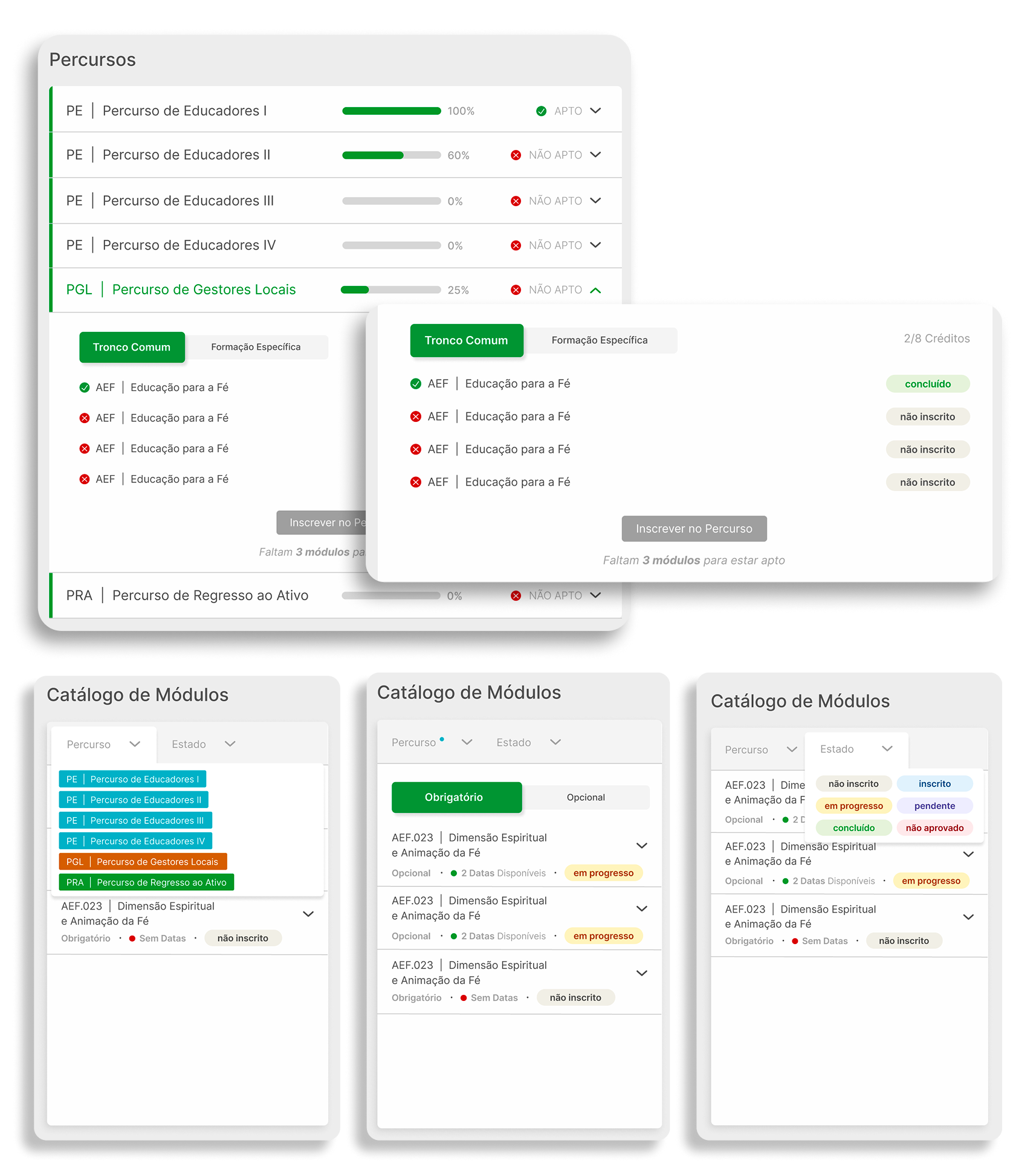
The structure is real and had to be respected. Training is organised into pathways — Educadores I–IV, Gestores Locais, Regresso ao Ativo — made of Tronco Comum and Formação Específica modules. Each module has editions, with city, dates, format, places and price.
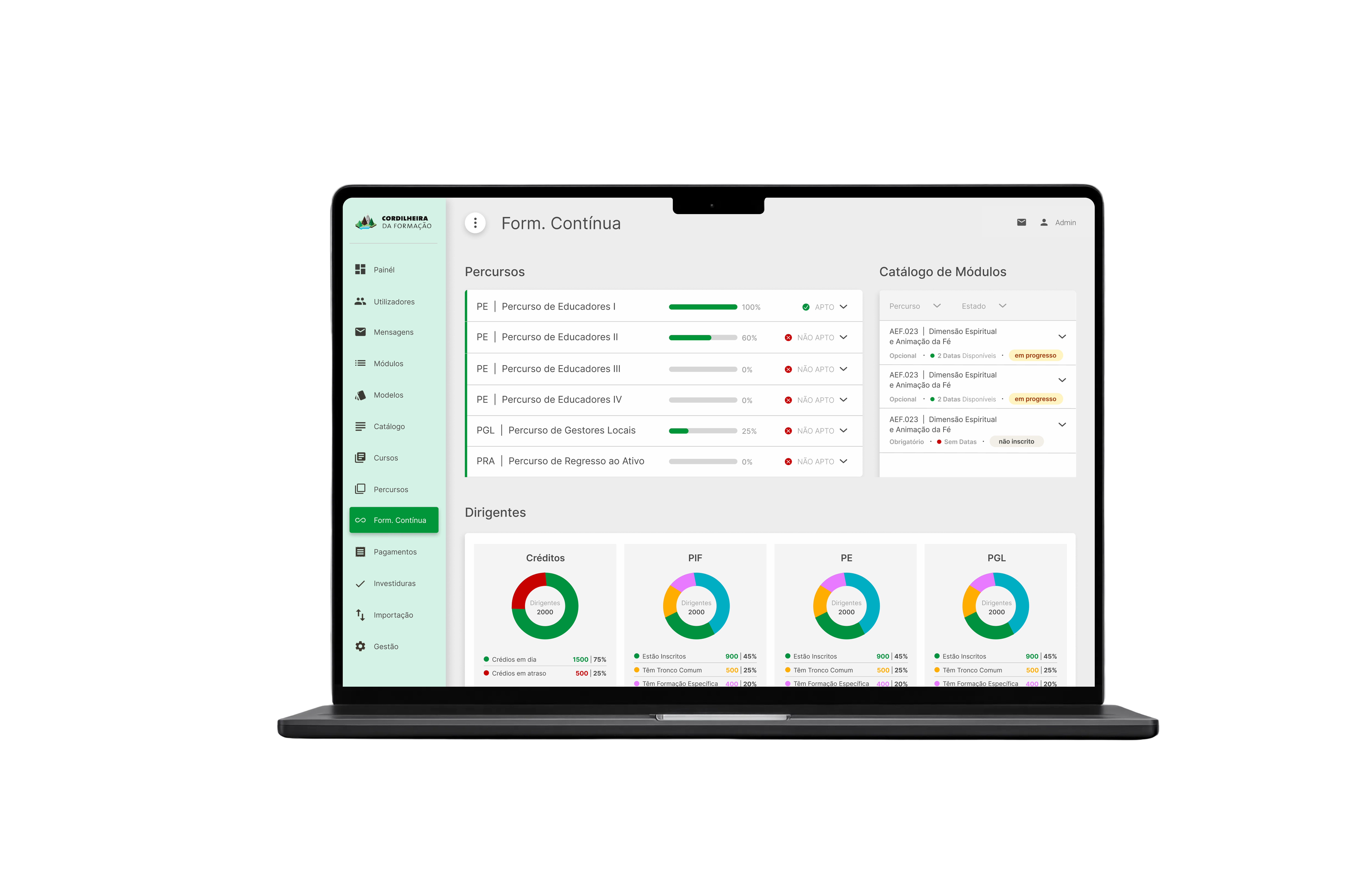
One screen, two jobs. For the leader the question is operational: where am I and what do I do next? For the coordinator it's analytical: who needs my attention and where can I act? Those aren't two levels of detail on the same thing — they're different questions answered from the same data.
There's no market competitor. The platform replaces email, spreadsheets and the memory of people who've tracked leaders for years. That sets the bar: we matched the spreadsheet on recording, and differentiated on the one thing it can't do — answering who's close to qualifying?
My Role
Product Designer for this module, end-to-end on the design: information architecture, state model, flows, high-fidelity interface and handoff documentation. The management view shipped with ten documented variants, each filter and CTA tied to the business rule that governs it.
I brought the alternatives and a recommendation; decisions were made with the team and the client. The three-signal separation is the one I argued hardest for.
I inherited the platform's visual language and updated it rather than creating a new one. A module joining twelve others shouldn't bring a second grammar.
The System
Credits, eligibility and status are three signals, not one.
A leader can have enough credits and still be NOT ELIGIBLE, because a prerequisite module is missing. They can be ELIGIBLE and enrolled in nothing. Collapsing those into a single indicator produces wrong readings with real consequences — someone who believes they're halfway and is actually stopped.
Access is cascading. Each level sees its own scope and everything below it, on the same page, with sections the leader never sees at all.
The same three signals are the filters. What you read is what you filter.
Decisions
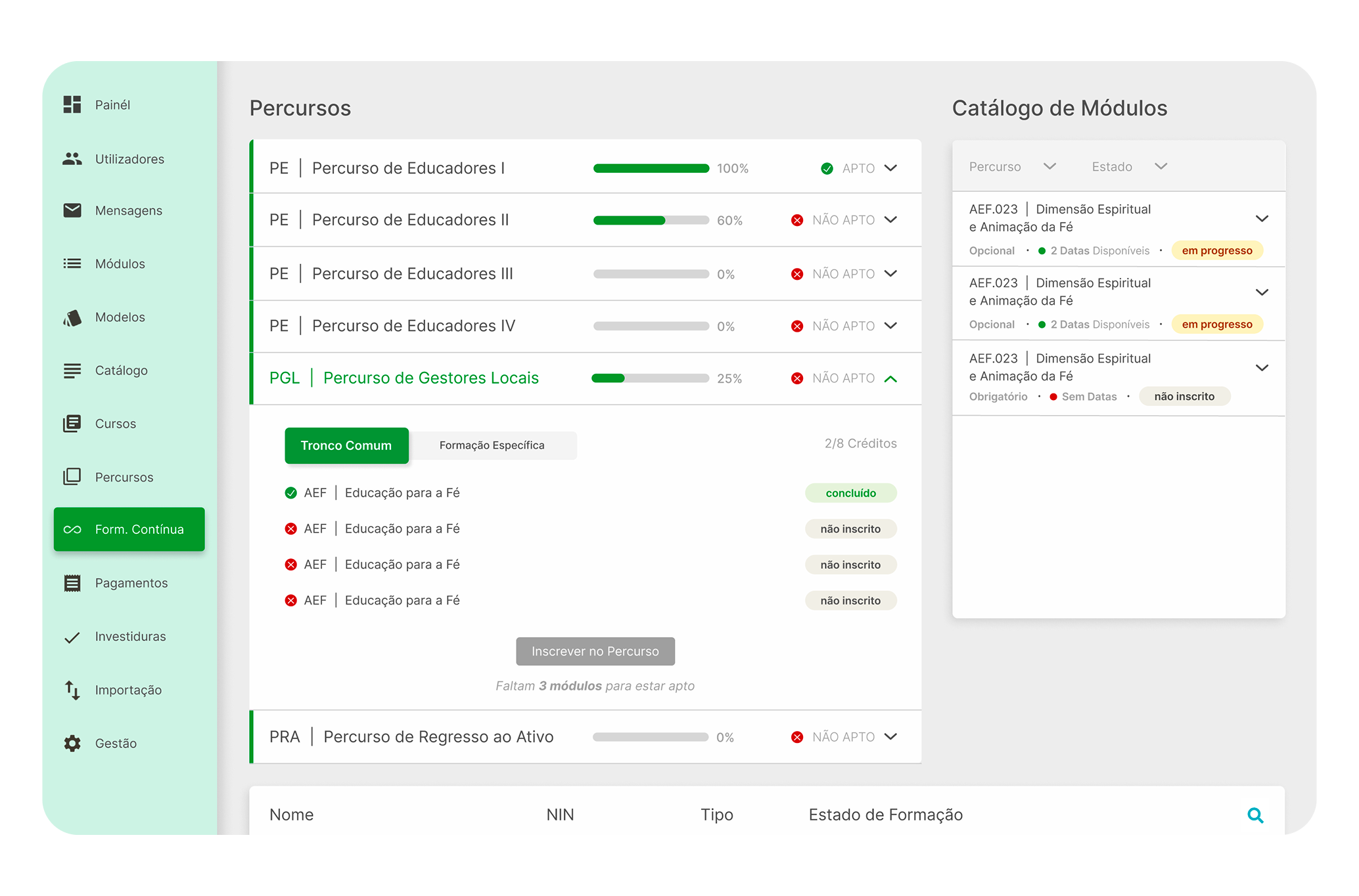
Three signals, three columns. Credits as a number with colour. Eligibility as ELIGIBLE or NOT ELIGIBLE. Status as enrolled or not. When prerequisites are missing, the interface says how many modules are outstanding and keeps the enrolment CTA inactive.
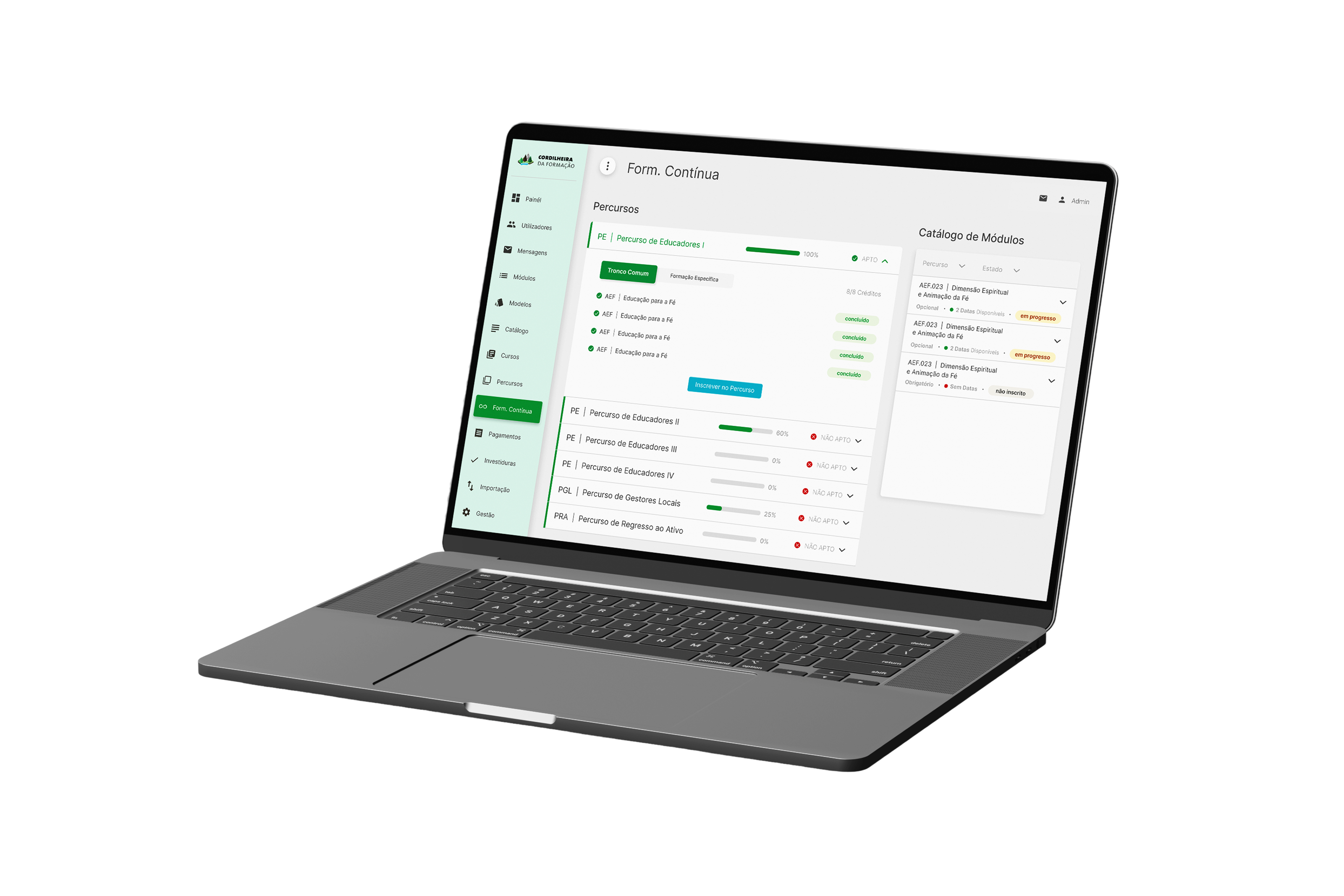
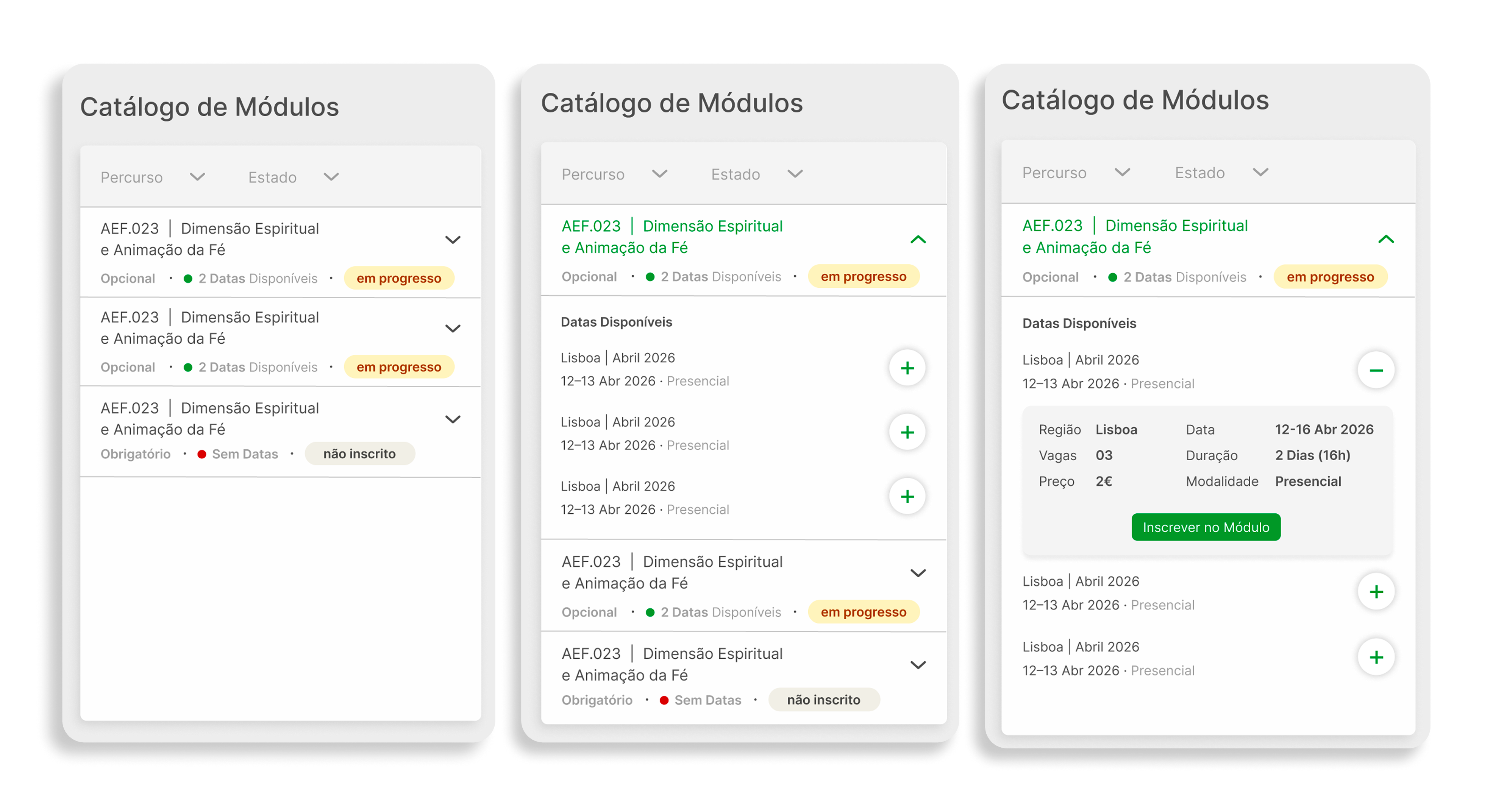
Two panels in the leader's view. The pathway panel and the module catalogue coexist on one screen. Context switching happens inside the view, not through navigation — because the task is cross-referencing one against the other, not consulting them separately.
Signals before interaction. Every module in the catalogue says whether it's mandatory or optional, whether dates are available, and what state it's in, before any click. Nobody discovers after entering that there was nothing to do there. The CTA lives on the edition, not the module, because the real action is always enrolling in a specific edition with a date, format and place.
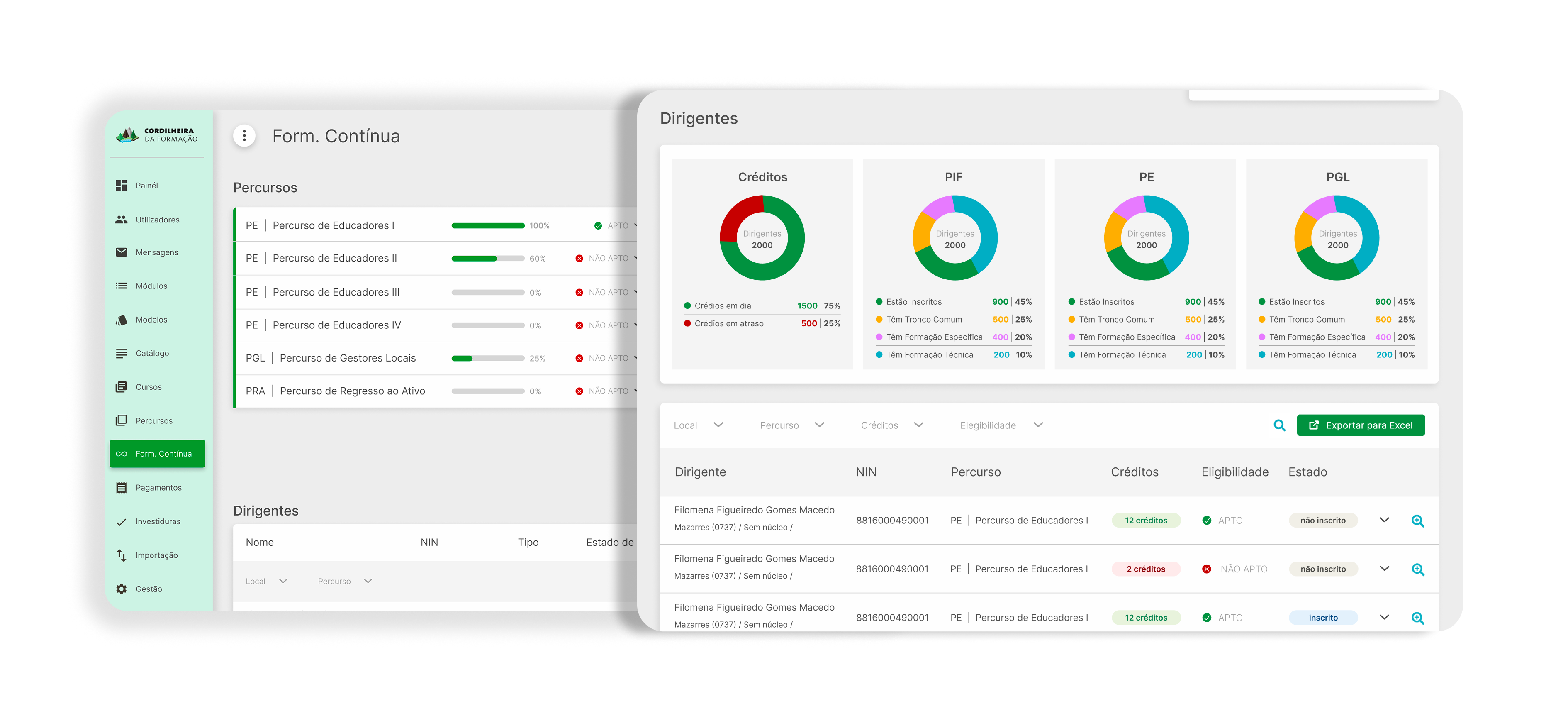
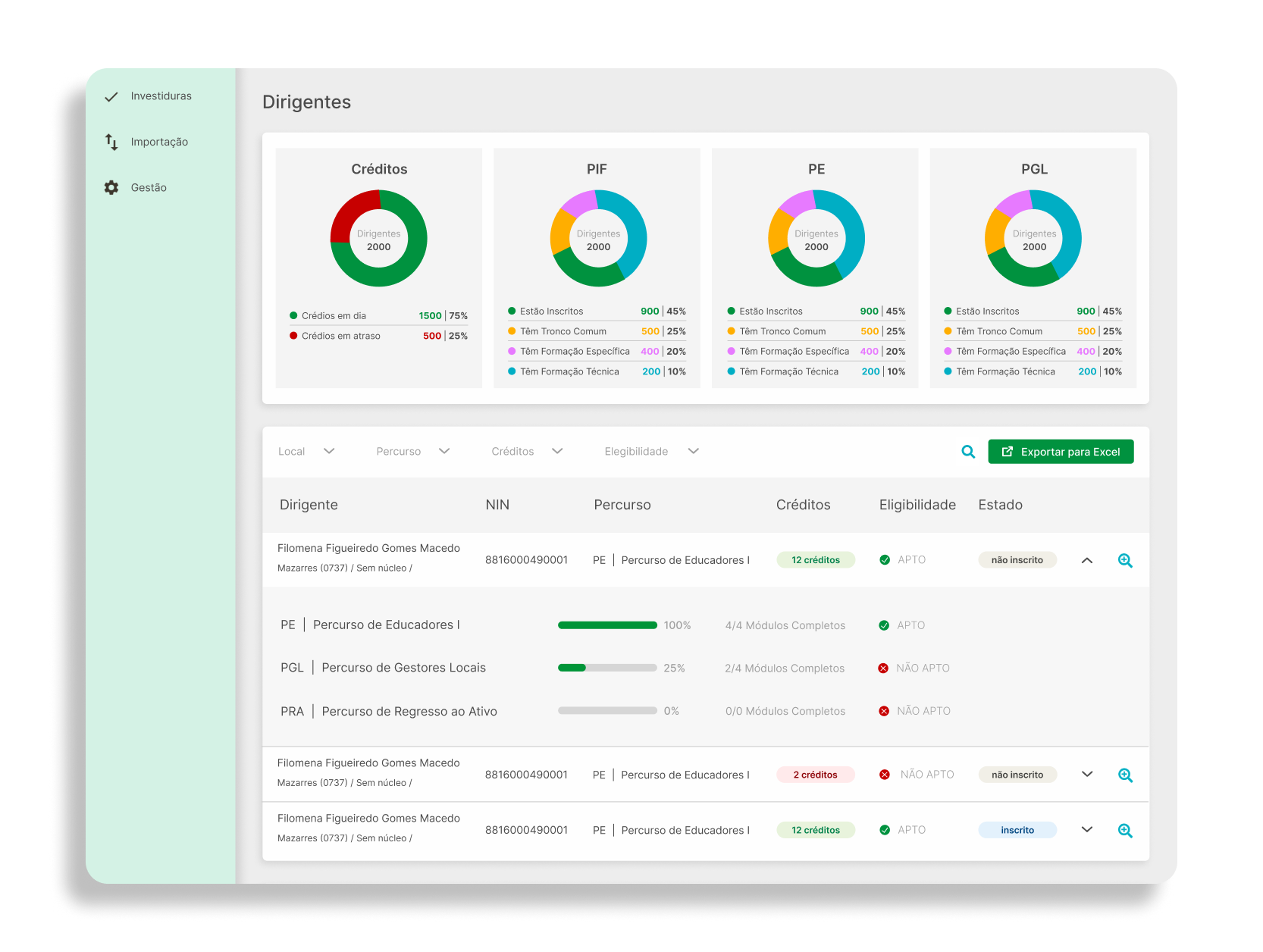
The management view surfaces proximity, not alphabet. Each row combines name, pathway, credits, eligibility and status. The collapsed level privileges closeness to the next pathway. The question the view answers moves from “who's here?” to “who's closest to advancing?”
An aggregate layer above the list. Charts summarise the distribution of leaders by credits and by pathway. They serve the moment before the list: understanding the overall state before deciding where to dig. The hierarchy is global view → pattern → filter → person → action.
Excel export at the top of the management list. Mandatory adoption guarantees people open the system. It doesn't guarantee they work inside it. A product that tries to erase the old tool doesn't win — it pushes that work out of sight, and the organisation is back to not knowing where anyone is.
Trade-offs
Risks named during the decision, and what I'd watch in implementation.
Alternative — separate pathways and catalogue into tabs.
Decision — both panels visible at once.
What it costs — more density on screen.
What I'd monitor — whether a leader can pick an edition without leaving the view that shows what's missing.
Alternative — all pathways always expanded.
Decision — progressive disclosure.
What it costs — anyone wanting detail pays one interaction.
What I'd monitor — whether people expand everything anyway, which would mean the collapse serves nothing.
Alternative — one progress indicator.
Decision — credits, eligibility and status separately.
What it costs — three columns and three filters where one would fit.
What I'd monitor — whether three signals side by side read as redundancy instead of distinction.
Alternative — a neutral alphabetical list.
Decision — highlight proximity to eligibility by default.
What it costs — the interface assumes a priority instead of treating every record equally.
What I'd monitor — the people furthest from eligibility are the ones who most need help, and are exactly who this ordering pushes down. This is the choice I'd watch first.
Testing & Metrics
To test the decision I was least certain about — ordering the management view by proximity to the next training pathway rather than alphabetically — I ran a 20-minute usability test with five coordinators responsible for managing training, focused on the management view where credits, eligibility and status show as three separate signals.
1 · Identifying who is closest to the next pathway
Task — who in your group is closest to qualifying for the next pathway?
Result — 5/5 answered correctly. Average time: 46 seconds. The combination of pathway, credits, eligibility and status made the intended priority visible without manual comparison.
2 · Identifying who needs help
Task — who is falling behind and needs help?
Result — this took considerably longer: average 1 minute 47 seconds, a 2.3× gap over task 1. 3/5 found the answer scanning the same ordered list; 2/5 started by looking for the lowest credit counts before checking eligibility, and missed people blocked by a prerequisite.
This was the exact risk I was testing: optimising the list for proximity to advancement can make the people furthest away — and potentially most in need of intervention — less visible.
3 · Understanding why someone can't enrol
Task — this person has enough credits but can't enrol. Explain why.
Result — 4/5 correctly identified the missing prerequisite module. One assumed credits alone should be sufficient and only noticed the missing prerequisite after inspecting the eligibility state.
This confirmed the three signals were doing different jobs — and why they need to stay visually distinct rather than collapsing into one.
Spreadsheet counter-metric
I closed by asking: would you still keep your spreadsheet? Why? 3/5 said yes — less because they trusted it more than the platform, more because they used it for broader planning and personal notes. That suggests the product can replace the calculation work without immediately replacing every surrounding workflow.
What changed because of it
The test challenged the default ordering rather than invalidating it. I'd keep proximity as the default — it answers the coordinator's first operational question — but add a dedicated Needs attention filter for people who are overdue, blocked or falling behind. That keeps the prioritisation logic while making the opposite need, intervention, explicit. The most useful finding: visibility and action aren't the same thing. A list can surface the right people and still make the wrong people hard to act on.
What I'd still instrument
Hypothesis — making eligibility explicit shortens the gap between becoming eligible and acting.
Test — cohort tracking on newly eligible leaders.
Metric — days between ELIGIBLE status and enrolment in the next pathway.
Hypothesis — the Needs attention view produces action, not just visibility.
Test — before and after on overdue credits surfaced there.
Metric — percentage of overdue credits brought current within 60 days of appearing. If this stays flat while the spreadsheet keeps circulating, visibility isn't converting into action.
Neither is running yet — the usability test measured comprehension in a moderated setting, not sustained behaviour once the tool is in daily use.
Learnings
Designing for data isn't the same as designing for decisions. The brief could have produced a list of leaders. The coordinator's actual job was deciding where to concentrate attention. That difference inverted the design order: first the decision the person has to make, then the data that supports it.
The spreadsheet wasn't the enemy. I started convinced the product replaced it. We changed our minds halfway and put the export inside. The principle I keep: in an internal system with mandatory adoption, the risk isn't that nobody shows up — it's that people comply with the record-keeping and keep working somewhere else.
The decision I most wanted to test is the one I ended up testing. Ordering the management view by proximity to eligibility instead of alphabetically has consequences for whoever falls outside — the usability test confirmed exactly that: the same ordering that helped 5/5 coordinators answer "who's closest" slowed down "who needs help" by 2.3×.
What's still open
The test measured comprehension in a 20-minute session, not sustained weekly use. Whether coordinators actually open the Needs attention view once it exists, rather than falling back to the spreadsheet, is unproven.
The ten state variants hold in documentation, not in a running system. Conditional rendering at that density is where implementation usually diverges from design.
Whether visibility becomes action is still the open question — now sharper, not settled. The test showed the risk is real; it didn't show the Needs attention fix resolves it, because that view doesn't exist yet.